FreeSections & components
Loading page…
1,192 words · 292 lines
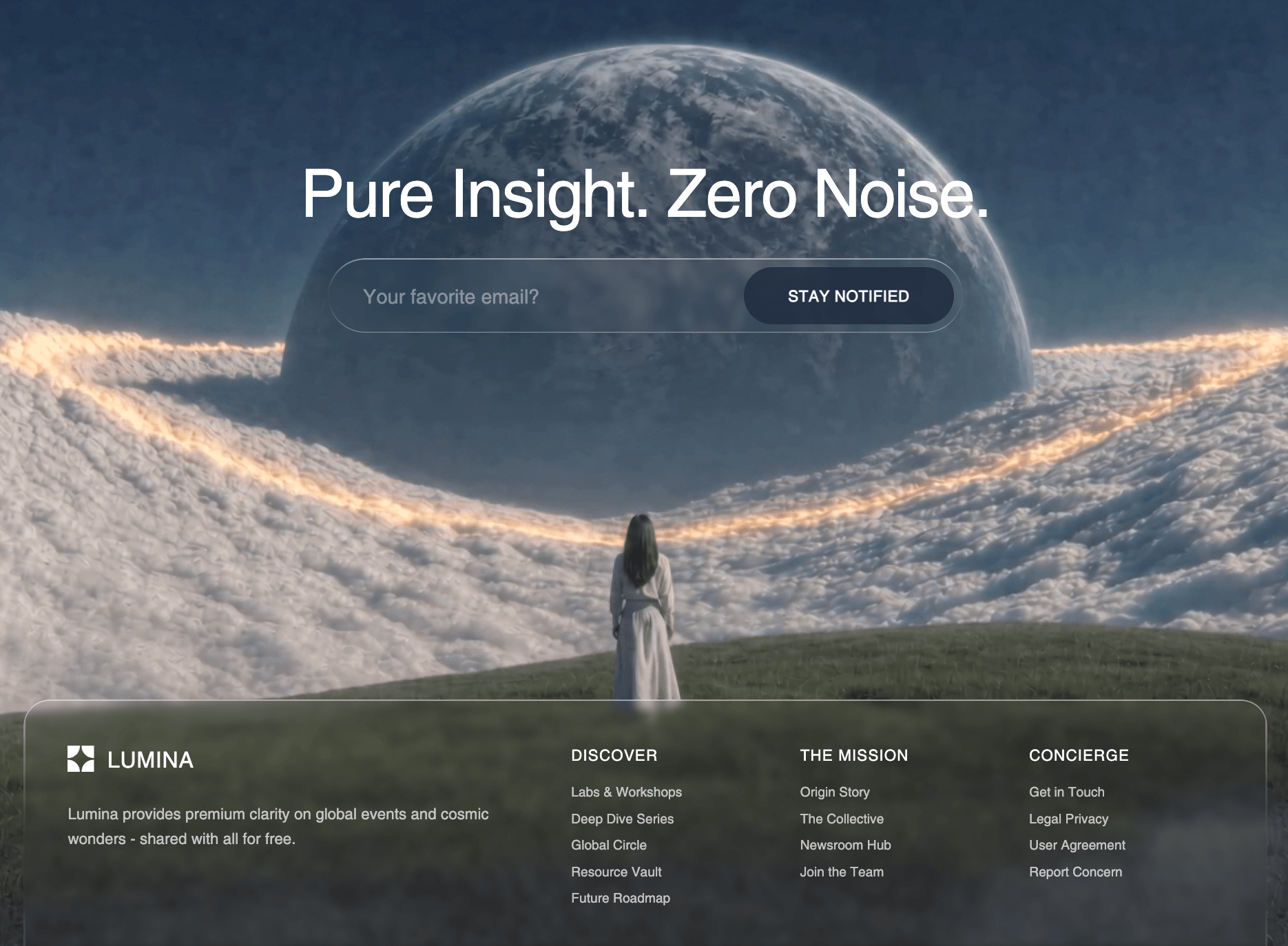
Build a "CTA + Footer" section component for a React + Vite + Tailwind CSS project. This is a cinematic full-width call-to-action section with an HLS video background, centered text, two CTA buttons, and a minimal footer bar at the bottom. Black background, white text, liquid glassmorphism effects.
---
### FONTS (import in index.css or HTML head)
```
https://fonts.googleapis.com/css2?family=Instrument+Serif:ital@0;1&family=Barlow:wght@300;400;500;600&display=swap
```
- Headings: `Instrument Serif` italic -- Tailwind class `font-heading`
- Body: `Barlow` -- Tailwind class `font-body`
Add to `tailwind.config.ts` under `theme.extend.fontFamily`:
```js
heading: ["'Instrument Serif'", "serif"],
body: ["'Barlow'", "sans-serif"],
```
Base styles in `index.css`:
```css
body {
font-family: 'Barlow', sans-serif;
background: #000;
color: #fff;
}
h1, h2, h3 {
font-family: 'Instrument Serif', serif;
}
```
---
### LIQUID GLASS CSS (add to index.css inside `@layer components`)
```css
@layer components {
.liquid-glass-strong {
background: rgba(255, 255, 255, 0.01);
background-blend-mode: luminosity;
backdrop-filter: blur(50px);
-webkit-backdrop-filter: blur(50px);
border: none;
box-shadow: 4px 4px 4px rgba(0, 0, 0, 0.05),
inset 0 1px 1px rgba(255, 255, 255, 0.15);
position: relative;
overflow: hidden;
}
.liquid-glass-strong::before {
content: '';
position: absolute;
inset: 0;
border-radius: inherit;
padding: 1.4px;
background: linear-gradient(
180deg,
rgba(255, 255, 255, 0.5) 0%,
rgba(255, 255, 255, 0.2) 20%,
rgba(255, 255, 255, 0) 40%,
rgba(255, 255, 255, 0) 60%,
rgba(255, 255, 255, 0.2) 80%,
rgba(255, 255, 255, 0.5) 100%
);
-webkit-mask: linear-gradient(#fff 0 0) content-box, linear-gradient(#fff 0 0);
-webkit-mask-composite: xor;
mask-composite: exclude;
pointer-events: none;
}
}
```
The `::before` pseudo-element uses a mask-composite trick to render a thin glowing gradient border that fades out in the middle of each side.
---
### DEPENDENCIES
```
npm install lucide-react hls.js
```
- `ArrowUpRight` icon from `lucide-react`
- `hls.js` for streaming the Mux HLS video
---
### HLS VIDEO URL (Mux)
```
https://stream.mux.com/8wrHPCX2dC3msyYU9ObwqNdm00u3ViXvOSHUMRYSEe5Q.m3u8
```
This is an HLS stream that requires `hls.js` to play in non-Safari browsers. Safari supports HLS natively via `<video>`.
---
### EXACT COMPONENT CODE
```tsx
import { useEffect, useRef } from "react";
import { ArrowUpRight } from "lucide-react";
import Hls from "hls.js";
const CtaFooter = () => {
const videoRef = useRef<HTMLVideoElement>(null);
useEffect(() => {
const video = videoRef.current;
if (!video) return;
const src = "https://stream.mux.com/8wrHPCX2dC3msyYU9ObwqNdm00u3ViXvOSHUMRYSEe5Q.m3u8";
if (Hls.isSupported()) {
const hls = new Hls();
hls.loadSource(src);
hls.attachMedia(video);
return () => hls.destroy();
} else if (video.canPlayType("application/vnd.apple.mpegurl")) {
video.src = src;
}
}, []);
return (
<section className="relative py-32 px-6 md:px-16 lg:px-24 text-center overflow-hidden">
{/* Background HLS Video */}
<video
ref={videoRef}
autoPlay
loop
muted
playsInline
className="absolute inset-0 w-full h-full object-cover z-0"
/>
{/* Top fade */}
<div
className="absolute top-0 left-0 right-0 z-[1] pointer-events-none"
style={{ height: '200px', background: 'linear-gradient(to bottom, black, transparent)' }}
/>
{/* Bottom fade */}
<div
className="absolute bottom-0 left-0 right-0 z-[1] pointer-events-none"
style={{ height: '200px', background: 'linear-gradient(to top, black, transparent)' }}
/>
{/* Content */}
<div className="relative z-10">
<h2 className="text-5xl md:text-6xl lg:text-7xl font-heading italic text-white tracking-tight leading-[0.85] max-w-3xl mx-auto mb-4">
Your next website starts here.
</h2>
<p className="text-white/60 font-body font-light text-sm md:text-base max-w-xl mx-auto mb-8">
Book a free strategy call. See what AI‑powered design can do. No commitment, no pressure. Just possibilities.
</p>
<div className="flex items-center justify-center gap-6">
<button className="liquid-glass-strong rounded-full px-6 py-3 text-sm font-medium text-white flex items-center gap-2 hover:bg-white/10 transition-all font-body">
Book a Call
<ArrowUpRight className="h-5 w-5" />
</button>
<button className="bg-white text-black rounded-full px-6 py-3 text-sm font-medium flex items-center gap-2 hover:bg-white/90 transition-colors font-body">
View Pricing
<ArrowUpRight className="h-4 w-4" />
</button>
</div>
{/* Footer */}
<div className="mt-32 pt-8 border-t border-white/10 flex flex-col md:flex-row items-center justify-between gap-4">
<p className="text-white/40 font-body font-light text-xs">
© 2026 Studio. All rights reserved.
</p>
<div className="flex items-center gap-6">
{["Privacy", "Terms", "Contact"].map((link) => (
<a key={link} href="#" className="text-white/40 hover:text-white/70 font-body font-light text-xs transition-colors">
{link}
</a>
))}
</div>
</div>
</div>
</section>
);
};
export default CtaFooter;
```
---
### SECTION STRUCTURE BREAKDOWN
```
<section> (relative, py-32, px-6 md:px-16 lg:px-24, text-center, overflow-hidden)
|
+-- <video> (absolute inset-0, full cover, z-0, autoPlay loop muted playsInline)
|
+-- Top gradient fade (absolute top-0, 200px tall, black->transparent, z-[1])
+-- Bottom gradient fade (absolute bottom-0, 200px tall, transparent<-black, z-[1])
|
+-- Content wrapper (relative z-10)
|
+-- <h2> heading
+-- <p> subtext
+-- Button row (flex, centered, gap-6)
| +-- "Book a Call" (liquid-glass-strong, rounded-full)
| +-- "View Pricing" (bg-white text-black, rounded-full)
|
+-- Footer bar (mt-32, border-t border-white/10)
+-- Copyright (left)
+-- Links: Privacy, Terms, Contact (right)
```
---
### HLS VIDEO SETUP PATTERN
The `useEffect` hook initializes `hls.js` for non-Safari browsers and falls back to native HLS for Safari:
1. Check `Hls.isSupported()` -- if true, create an `Hls` instance, load the `.m3u8` source, attach to the `<video>` element
2. If not supported but the browser can play `application/vnd.apple.mpegurl` (Safari), set `video.src` directly
3. Cleanup: `hls.destroy()` on unmount
The `<video>` element uses `autoPlay loop muted playsInline` -- all four attributes are required for autoplay to work across browsers (especially mobile).
---
### VIDEO OVERLAY FADE PATTERN
Two absolutely positioned `<div>` elements create black gradient fades at the top and bottom edges, making the video blend seamlessly into the surrounding black background:
- **Top fade**: `height: 200px`, `background: linear-gradient(to bottom, black, transparent)`, `z-[1]`, `pointer-events-none`
- **Bottom fade**: `height: 200px`, `background: linear-gradient(to top, black, transparent)`, `z-[1]`, `pointer-events-none`
Content sits at `z-10` above both the video and the fades.
---
### RESPONSIVE BEHAVIOR
| Breakpoint | Heading size | Padding | Footer layout |
|---|---|---|---|
| Mobile (default) | `text-5xl` | `px-6` | Stacked column (`flex-col`) |
| Tablet (`md:`) | `text-6xl` | `px-16` | Horizontal row (`md:flex-row`) |
| Desktop (`lg:`) | `text-7xl` | `px-24` | Horizontal row |
- Button row always horizontal (`flex items-center justify-center gap-6`), buttons stack naturally if viewport is very narrow
- Footer: `flex-col md:flex-row` -- copyright and links stack on mobile, sit side-by-side on tablet+
- Subtext constrained to `max-w-xl mx-auto`
- Heading constrained to `max-w-3xl mx-auto`
---
### TYPOGRAPHY DETAILS
| Element | Classes |
|---|---|
| Heading | `text-5xl md:text-6xl lg:text-7xl font-heading italic text-white tracking-tight leading-[0.85] max-w-3xl mx-auto mb-4` |
| Subtext | `text-white/60 font-body font-light text-sm md:text-base max-w-xl mx-auto mb-8` |
| Glass button text | `text-sm font-medium text-white font-body` |
| Solid button text | `text-sm font-medium` (inherits `text-black` from `bg-white text-black`) |
| Copyright | `text-white/40 font-body font-light text-xs` |
| Footer links | `text-white/40 hover:text-white/70 font-body font-light text-xs transition-colors` |
---
### BUTTON DETAILS
**Primary CTA ("Book a Call"):**
`liquid-glass-strong rounded-full px-6 py-3 text-sm font-medium text-white flex items-center gap-2 hover:bg-white/10 transition-all font-body`
- Glass background with gradient border via `::before`
- `ArrowUpRight` icon at `h-5 w-5`
**Secondary CTA ("View Pricing"):**
`bg-white text-black rounded-full px-6 py-3 text-sm font-medium flex items-center gap-2 hover:bg-white/90 transition-colors font-body`
- Solid white background, black text
- `ArrowUpRight` icon at `h-4 w-4` (slightly smaller than the primary)
---
### EXACT TEXT CONTENT
**Heading**: "Your next website starts here."
**Subtext**: "Book a free strategy call. See what AI-powered design can do. No commitment, no pressure. Just possibilities."
**Button 1**: "Book a Call"
**Button 2**: "View Pricing"
**Copyright**: "(c) 2026 Studio. All rights reserved."
**Footer links**: "Privacy", "Terms", "Contact"
---
### PARENT CONTEXT
This section sits on a `bg-black` parent container as the last section of the page. The top gradient fade blends the video into the section above (which also has a black background). The footer bar is part of this same component -- there is no separate footer component.