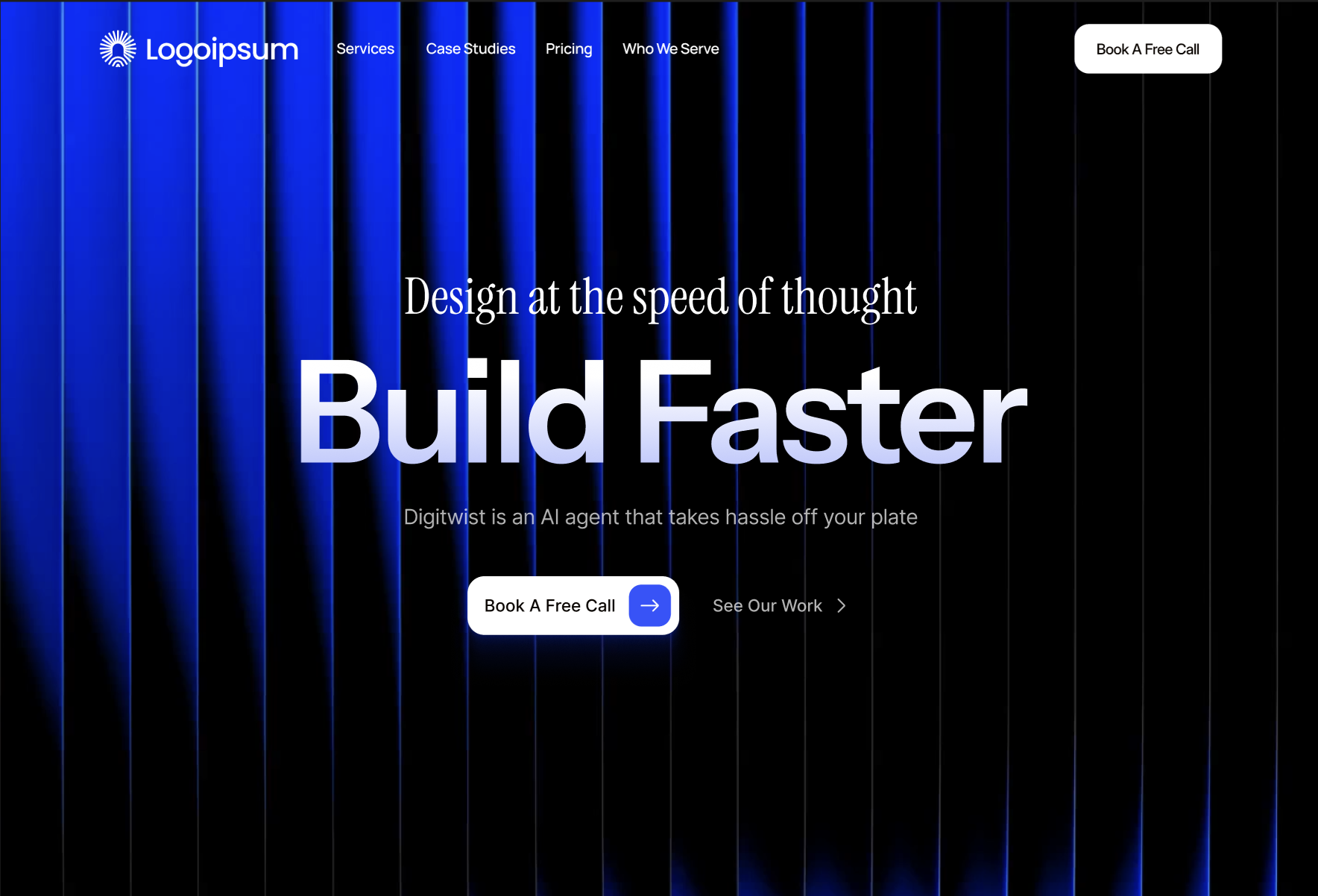

FreeHero sections
718 words · 166 lines
Create a dark mode hero section for an AI website builder with the following exact specifications:

## Technical Setup

### Required Packages
Install these packages:
- `motion` (version 12.23.24 or later) - for animations
- `hls.js` (version 1.6.15 or later) - for video streaming
- `lucide-react` (version 0.487.0 or later) - for icons

### Fonts
Import these Google Fonts:
```css
@import url('https://fonts.googleapis.com/css2?family=Instrument+Sans:ital,wght@0,400..700;1,400..700&family=Instrument+Serif:ital@0;1&display=swap');
```

## Layout Structure

### Navbar Component
Create a fixed, transparent navbar with:

**Position & Styling:**
- Fixed to top, full width, z-index 50
- Background: fully transparent (bg-transparent)
- Padding: px-6 py-4
- Flexbox layout: items-center justify-between

**Left Section:**
- Sunburst icon (24x24px SVG) in white color

**Center Section** (hidden on mobile, visible md:flex):
- Navigation links: "Products" (with ChevronDown icon), "Customer Stories", "Resources", "Pricing"
- Font: Instrument Sans, text-sm, font-medium
- Color: text-white/80, hover:text-white
- Gap: gap-8

**Right Section:**
- "Book A Demo" link (hidden on small screens, sm:block)
- "Get Started" button: white background, black text, rounded-full, px-5 py-2.5, font-semibold

### Hero Section Component

**Container:**
- Relative positioning, full width, min-h-screen
- Background color: #000000 (pure black)
- Text color: white
- Overflow hidden

**Background Video Layer:**
- Video URL: https://stream.mux.com/T6oQJQ02cQ6N01TR6iHwZkKFkbepS34dkkIc9iukgy400g.m3u8
- Video implementation using HLS.js with Safari fallback
- Video properties: muted, loop, playsInline
- Object-fit: cover, opacity: 60%
- Poster image fallback: https://images.unsplash.com/photo-1647356191320-d7a1f80ca777?crop=entropy&cs=tinysrgb&fit=max&fm=jpg&ixid=M3w3Nzg4Nzd8MHwxfHNlYXJjaHwxfHxhYnN0cmFjdCUyMGRhcmslMjB0ZWNobm9sb2d5JTIwbmV1cmFsJTIwbmV0d29ya3xlbnwxfHx8fDE3Njg5NzIyNTV8MA&ixlib=rb-4.1.0&q=80&w=1080

**Video Overlay:**
- Black overlay: bg-black/60 with backdrop-blur-[2px]

**Decorative Gradients:**
- Top-left gradient: position top-[-20%] left-[20%], size 600x600px, bg-blue-900/20, blur-[120px], mix-blend-screen
- Bottom-right gradient: position bottom-[-10%] right-[20%], size 500x500px, bg-indigo-900/20, blur-[120px], mix-blend-screen

**Content Container:**
- Max-width: 5xl (max-w-5xl)
- Center aligned (mx-auto, items-center, text-center)
- Z-index: 10, top margin: mt-20
- Vertical spacing: space-y-12

**Pre-headline:**
- Text: "Design at the speed of thought"
- Font: Instrument Serif
- Size: text-3xl (mobile), sm:text-5xl, lg:text-[48px]
- Line height: leading-[1.1]
- Color: white
- Animation: Motion fade up (opacity 0→1, y 20→0, duration 0.6s)

**Main Headline:**
- Text: "Build Faster"
- Font: Instrument Sans, font-semibold
- Size: text-6xl (mobile), sm:text-8xl, lg:text-[136px]
- Line height: leading-[0.9], letter spacing: tracking-tighter
- Gradient: bg-gradient-to-b from-white via-white to-[#b4c0ff]
- Text effect: bg-clip-text text-transparent
- Animation: Motion scale (opacity 0→1, scale 0.9→1, delay 0.2s, duration 0.6s)

**Subheadline:**
- Text: "Create fully functional, SEO-optimized websites in seconds with our advanced AI engine."
- Font: Instrument Sans
- Size: text-lg (mobile), sm:text-[20px]
- Line height: leading-[1.65]
- Color: white, opacity-70
- Max width: max-w-xl
- Animation: Motion fade (opacity 0→0.7, delay 0.4s, duration 0.6s)

**CTA Buttons:**

Primary Button:
- Style: White pill-shaped with blue arrow
- Layout: pl-6 pr-2 py-2, rounded-full
- Background: white
- Text: "Start Building Free" (font-medium, text-lg, Instrument Sans, color #0a0400)
- Arrow container: 40x40px circle, bg-[#3054ff], hover:bg-[#2040e0]
- Icon: ArrowRight (lucide-react), white, 20x20px
- Hover effect: shadow-[0_0_20px_rgba(255,255,255,0.3)], scale-105

Secondary Button:
- Text: "See Examples"
- Style: text link with arrow
- Color: text-white/70, hover:text-white
- Background: backdrop-blur-sm, hover:bg-white/5
- Padding: px-4 py-2, rounded-lg
- Icon: ArrowRight with group-hover:translate-x-1 transition

Button Container:
- Layout: flex-col (mobile), sm:flex-row
- Gap: gap-6, items centered
- Animation: Motion fade up (opacity 0→1, y 20→0, delay 0.6s, duration 0.5s)

## HLS.js Video Implementation
```tsx
import { useEffect, useRef } from "react";
import Hls from "hls.js";

const videoRef = useRef<HTMLVideoElement>(null);
const videoSrc = "https://stream.mux.com/T6oQJQ02cQ6N01TR6iHwZkKFkbepS34dkkIc9iukgy400g.m3u8";

useEffect(() => {
  const video = videoRef.current;
  if (!video) return;

  if (Hls.isSupported()) {
    const hls = new Hls();
    hls.loadSource(videoSrc);
    hls.attachMedia(video);
    hls.on(Hls.Events.MANIFEST_PARSED, () => {
      video.play().catch((e) => console.log("Auto-play prevented:", e));
    });
    return () => {
      hls.destroy();
    };
  } else if (video.canPlayType("application/vnd.apple.mpegurl")) {
    video.src = videoSrc;
    video.addEventListener("loadedmetadata", () => {
      video.play().catch((e) => console.log("Auto-play prevented:", e));
    });
  }
}, []);
```

## Motion Animations
Import: `import { motion } from "motion/react"`

- Pre-headline: initial={{ opacity: 0, y: 20 }} animate={{ opacity: 1, y: 0 }} transition={{ duration: 0.6 }}
- Main headline: initial={{ opacity: 0, scale: 0.9 }} animate={{ opacity: 1, scale: 1 }} transition={{ delay: 0.2, duration: 0.6 }}
- Subheadline: initial={{ opacity: 0 }} animate={{ opacity: 0.7 }} transition={{ delay: 0.4, duration: 0.6 }}
- Buttons: initial={{ opacity: 0, y: 20 }} animate={{ opacity: 1, y: 0 }} transition={{ delay: 0.6, duration: 0.5 }}

## Color Palette
- Background: #000000
- Primary text: white
- Secondary text: white/80, white/70
- Primary button background: white
- Primary button text: #0a0400
- Primary button accent: #3054ff, hover #2040e0
- Gradient end color: #b4c0ff
- Decorative gradients: blue-900/20, indigo-900/20
