
FreeHero sections
462 words · 50 lines
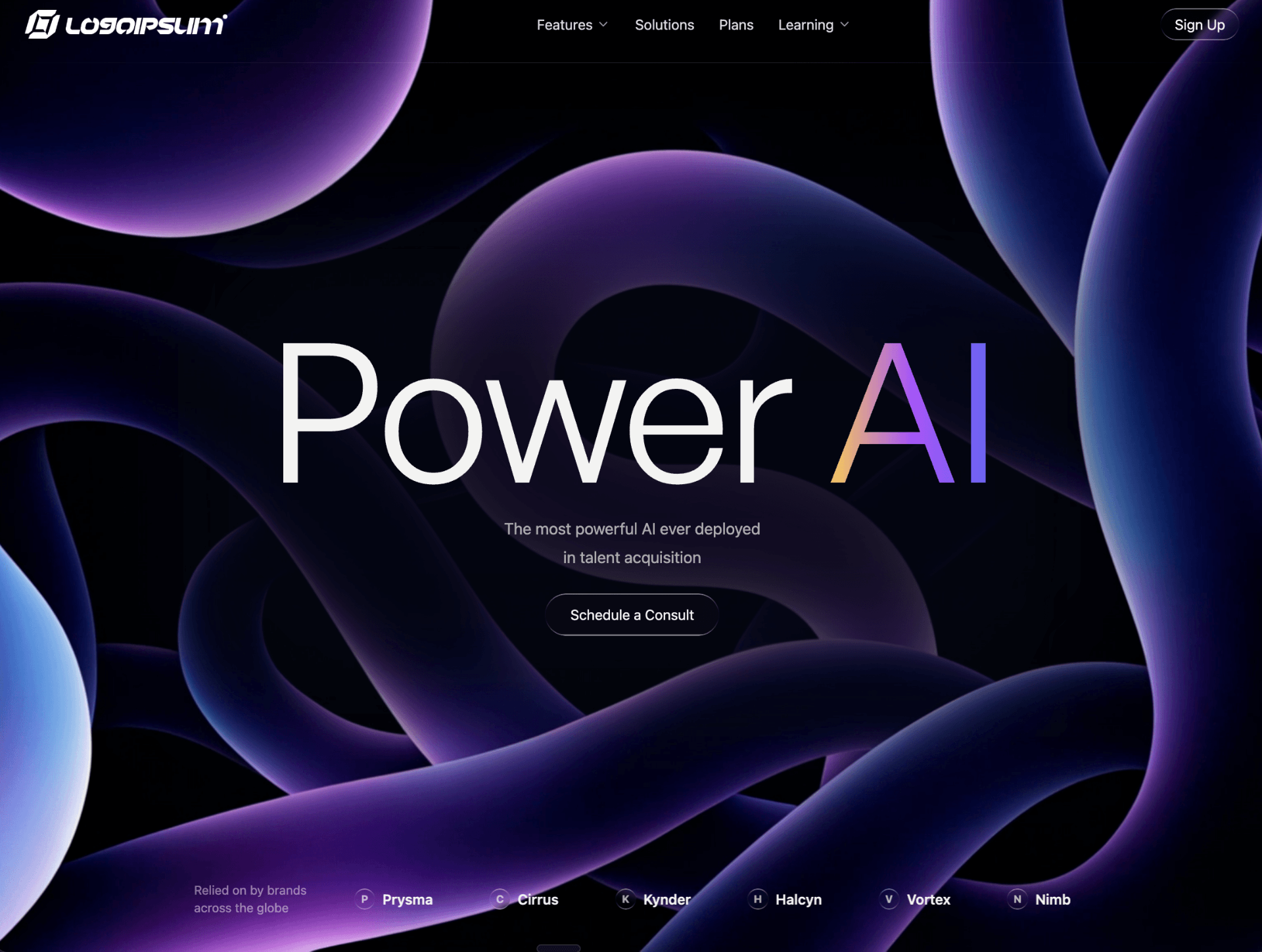
Create a full-screen dark hero section with a looping background video, navbar, headline, subtitle, CTA button, and a logo marquee at the bottom. Here are the exact specifications:

Theme & Colors (index.css CSS variables):
Background: 260 87% 3% (deep dark blue-purple)
Foreground: 40 6% 95% (off-white)
Hero sub text: 40 6% 82%
Body font: Geist Sans (via @fontsource/geist-sans)
Headline font: General Sans (loaded from Fontshare: https://api.fontshare.com/v2/css?f[]=general-sans@400,500,600,700&display=swap)

Background Video (Index page wrapper):
Video URL: https://d8j0ntlcm91z4.cloudfront.net/user_38xzZboKViGWJOttwIXH07lWA1P/hf_20260328_065045_c44942da-53c6-4804-b734-f9e07fc22e08.mp4
Positioned absolute inset-0 w-full h-full object-cover behind all content
Starts with opacity: 0
Custom JS-controlled fade loop: 0.5s fade-in at start, 0.5s fade-out at end, using requestAnimationFrame. On ended, opacity resets to 0, waits 100ms, then replays from 0
No gradient overlays on the video
The wrapper div has overflow-hidden, the hero content sits in a relative z-10 div above

Blurred overlay shape (centered behind content):
w-[984px] h-[527px] opacity-90 bg-gray-950 blur-[82px]
Absolutely positioned at top-1/2 left-1/2 -translate-x-1/2 -translate-y-1/2
pointer-events-none
The hero section has overflow-visible so the blur is not clipped

Navbar:
Full width, py-5 px-8, flex row with justify-between
Left: logo image (src/assets/logo.png, height 32px)
Center: nav items — "Features" (with ChevronDown), "Solutions", "Plans", "Learning" (with ChevronDown). Each is a button with text-foreground/90 and hover transition
Right: "Sign Up" button using heroSecondary variant, rounded-full px-4 py-2
Below navbar: a 1px divider line with gradient from-transparent via-foreground/20 to-transparent, offset mt-[3px]

Hero content (vertically centered in remaining space via flex-1):
Headline: "Power AI" at text-[220px], font-normal, leading-[1.02], tracking-[-0.024em], font-family General Sans
"Power " is plain text-foreground
"AI" uses bg-clip-text text-transparent with backgroundImage: linear-gradient(to left, #6366f1, #a855f7, #fcd34d) (indigo → purple → amber)
Subtitle: "The most powerful AI ever deployed / in talent acquisition" — text-hero-sub, text-lg, leading-8, max-w-md, mt-[9px], opacity-80
CTA: "Schedule a Consult" button, heroSecondary variant, px-[29px] py-[24px], mt-[25px]

Logo marquee (pinned to bottom of hero, pb-10):
Container: max-w-5xl mx-auto
Left side: static text "Relied on by brands / across the globe" in text-foreground/50 text-sm
Right side: infinite scrolling marquee with logos: Vortex, Nimbus, Prysma, Cirrus, Kynder, Halcyn (duplicated for seamless loop)
Each logo: a liquid-glass 24x24 rounded-lg icon showing the first letter, plus the name in text-base font-semibold text-foreground
Marquee animation: translateX(0%) → translateX(-50%), 20s linear infinite
gap-16 between logos, gap-12 between text and marquee

Liquid glass utility class (in index.css):
.liquid-glass { background: rgba(255, 255, 255, 0.01); background-blend-mode: luminosity; backdrop-filter: blur(4px); border: none; box-shadow: inset 0 1px 1px rgba(255, 255, 255, 0.1); position: relative; overflow: hidden; }
.liquid-glass::before { content: ""; position: absolute; inset: 0; border-radius: inherit; padding: 1.4px; background: linear-gradient(180deg, rgba(255,255,255,0.45) 0%, rgba(255,255,255,0.15) 20%, rgba(255,255,255,0) 40%, rgba(255,255,255,0) 60%, rgba(255,255,255,0.15) 80%, rgba(255,255,255,0.45) 100%); -webkit-mask: linear-gradient(#fff 0 0) content-box, linear-gradient(#fff 0 0); -webkit-mask-composite: xor; mask-composite: exclude; pointer-events: none; }

Section structure: min-h-screen flex flex-col — navbar at top, content centered via flex-1 flex items-center justify-center, marquee at bottom.
