
FreeHero sections
503 words · 56 lines
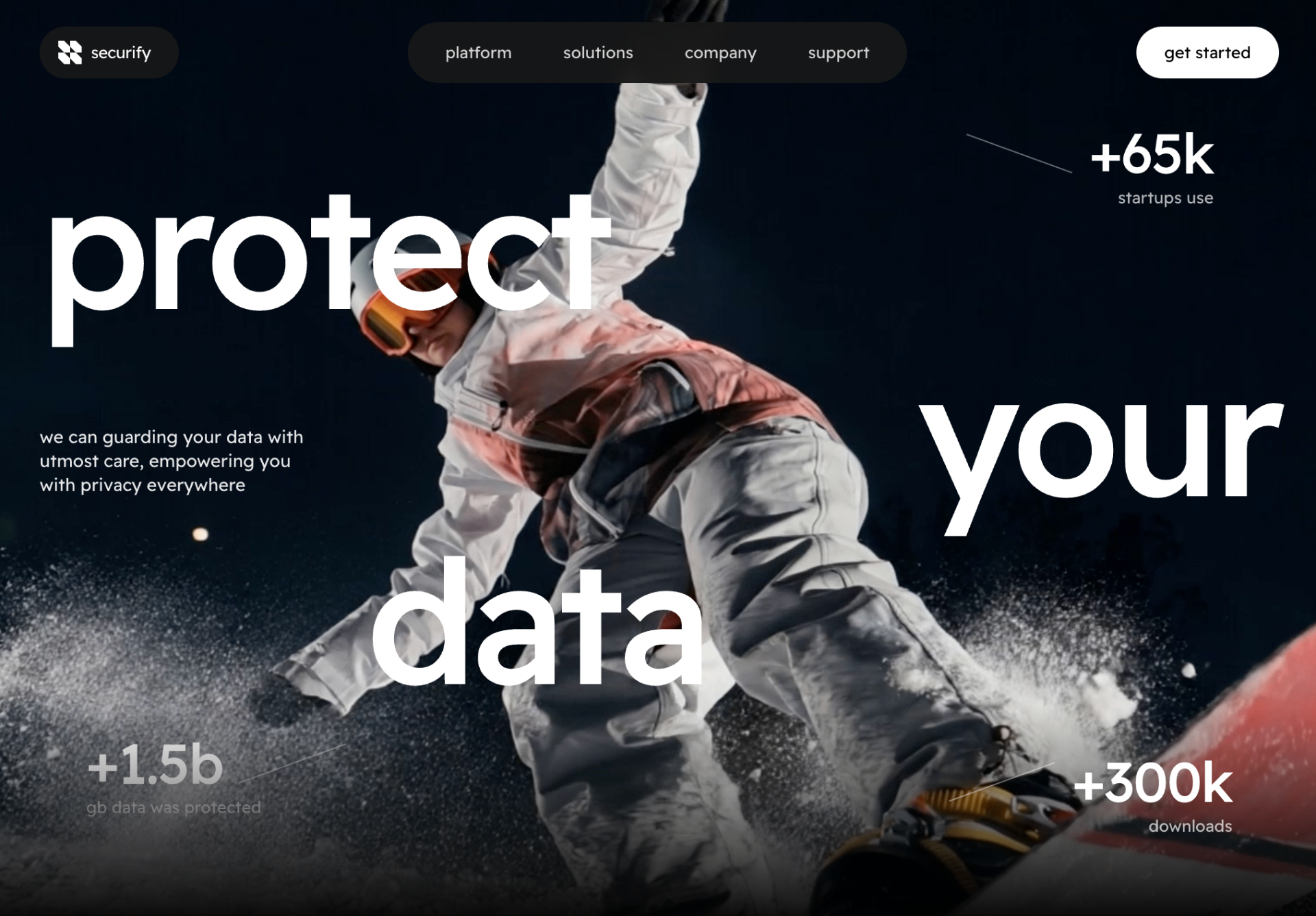
Build a full-screen hero section for a data-security SaaS landing page called "securify" using React + TypeScript + Tailwind CSS, with a looping fullscreen background video, a floating pill-shaped navbar, and large staggered typography.

Fonts & Global Styles

Load Google font "Readex Pro" weights 300, 400, 500, 600, 700.
Set body font-family: 'Readex Pro', system-ui, -apple-system, sans-serif;, background #000, color #fff, antialiased.
Make html, body, #root height 100%.
Add a .hero-title class with letter-spacing: -0.04em; line-height: 0.95;.
Section container

A <section> with classes: relative h-screen w-full overflow-hidden bg-black.
Background video

<video> with className="absolute inset-0 w-full h-full object-cover", autoPlay loop muted playsInline, and src="https://d8j0ntlcm91z4.cloudfront.net/user_38xzZboKViGWJOttwIXH07lWA1P/hf_20260418_063509_7d167302-4fd4-480b-8260-18ab572333d4.mp4".
Navbar (absolute, z-20, px-6 md:px-10 pt-6, top-0 left-0 right-0)

A <nav> with flex items-center justify-between gap-4.
Left pill: flex items-center gap-2 bg-neutral-900/90 backdrop-blur rounded-full pl-4 pr-6 py-3 containing:
A custom white SVG logo (viewBox 0 0 256 256, class h-5 w-5) with path: M 128 192 L 128 256 L 64.5 256 L 32 223 L 0 192 L 0 128 L 64 128 Z M 256 192 L 256 256 L 192.5 256 L 160 223 L 128 192 L 128 128 L 192 128 Z M 128 64 L 128 128 L 64.5 128 L 32 95 L 0 64 L 0 0 L 64 0 Z M 256 64 L 256 128 L 192.5 128 L 160 95 L 128 64 L 128 0 L 192 0 Z filled #ffffff.
Brand text "securify" (text-white text-sm font-normal tracking-tight).
Center pill (hidden on mobile): hidden md:flex items-center gap-1 bg-neutral-900/90 backdrop-blur rounded-full px-3 py-2 with four anchor links: "platform", "solutions", "company", "support" — each text-neutral-300 hover:text-white transition-colors text-sm px-5 py-2 rounded-full.
Right button: "get started" — bg-white text-black text-sm font-normal rounded-full px-6 py-3 hover:bg-neutral-200 transition-colors.
Foreground content wrapper: relative h-full w-full (rendered after Navbar, above the video).

Three giant staggered headline words (each an <h1> with class hero-title absolute text-white font-medium text-[14vw] md:text-[13vw]):

"protect" — left-4 md:left-10 top-[18%]
"your" — right-4 md:right-10 top-[38%]
"data" — left-[18%] md:left-[28%] top-[58%]
All lowercase.

Description paragraph (absolute, left-6 md:left-10 top-[46%], max-w-[240px] text-[15px] leading-snug text-white/90):

"we can guarding your data with utmost care, empowering you with privacy everywhere"

Stat block — top-right (absolute right-6 md:right-24 top-[14%]):

Row: flex items-center gap-3 justify-end — a diagonal divider (hidden md:block h-px w-24 bg-white/40 rotate-[20deg]) then number "+65k" (text-4xl md:text-5xl font-medium tracking-tight).
Sublabel: "startups use" (text-xs md:text-sm text-white/70 mt-1 text-right).
Bottom gradient overlay: pointer-events-none absolute bottom-0 left-0 right-0 h-48 bg-gradient-to-b from-transparent to-black.

Stat block — bottom-left (absolute left-6 md:left-20 bottom-20 md:bottom-24):

Row: number "+1.5b" then divider hidden md:block h-px w-24 bg-white/40 rotate-[-20deg].
Sublabel: "gb data was protected" (text-xs md:text-sm text-white/70 mt-1).
Stat block — bottom-right (absolute right-6 md:right-20 bottom-16 md:bottom-20):

Row: diagonal divider rotate-[-20deg] then "+300k".
Sublabel: "downloads" (right-aligned, text-white/70).
Notes

All text is lowercase.
Navbar pills use bg-neutral-900/90 backdrop-blur.
Only transitions: hover:text-white on nav links, hover:bg-neutral-200 on the button.
No purple/indigo anywhere; palette is pure black, white, neutral-900, and white opacity variants (white/40, white/70, white/90).
Responsive: mobile hides nav links and diagonal dividers; typography scales via vw units.

