
FreeHero sections
501 words · 44 lines
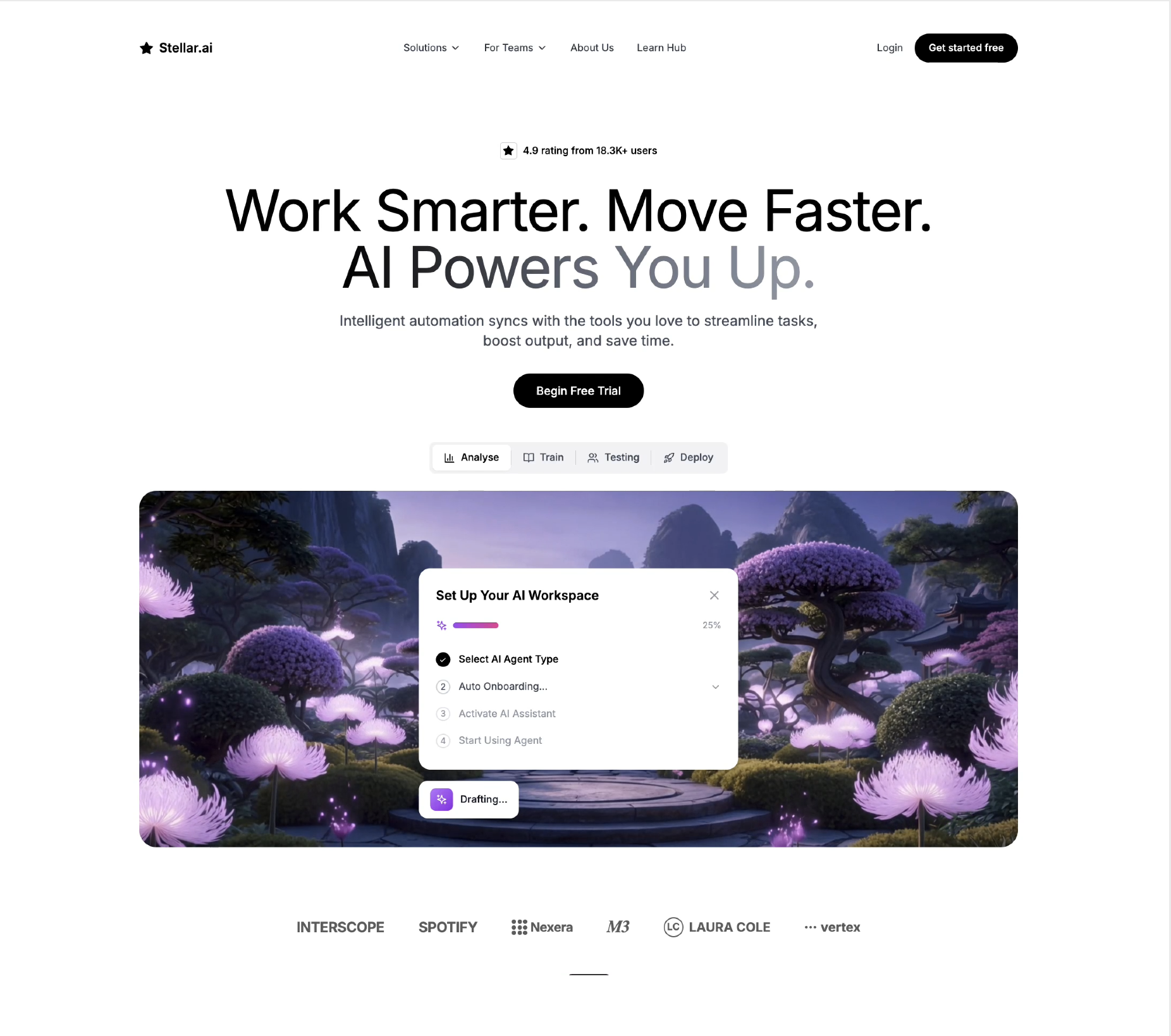
Create a "Stellar.ai" landing page hero section using React, Tailwind CSS, and Lucide React icons. Use the Inter font (imported from Google Fonts). The page has a white background (bg-white), max-width max-w-7xl, and is centered with mx-auto.

Font: Import Inter (weights 400, 500, 600, 700) from Google Fonts. Set font-family: 'Inter', sans-serif on the body.

Custom CSS animations (in index.css):

@keyframes fadeInUp -- from opacity: 0; transform: translateY(30px) to opacity: 1; transform: translateY(0). Class .animate-fade-in-up uses this with 0.6s ease-out forwards.
@keyframes fadeInOverlay -- from opacity: 0 to opacity: 1. Class .animate-fade-in-overlay uses this with 0.4s ease-out forwards.
@keyframes fadeInDialog -- from opacity: 0 to opacity: 1. Class .animate-slide-up-overlay uses this with 0.5s ease-out forwards and has transform: translate(-50%, -50%).
Every major section uses .animate-fade-in-up with staggered animationDelay inline styles (starting at 0.1s and incrementing by 0.1s). Each element starts with opacity: 0 inline so the animation fills it to visible.

Tailwind config: Default config with no custom theme extensions. Uses standard content paths.

NAVIGATION (animationDelay: 0.1s):
px-6 py-4 flex items-center justify-between max-w-7xl mx-auto
Left: Lucide Star icon (w-5 h-5, fill-black) + "Stellar.ai" text (text-lg font-semibold)
Center (hidden on mobile, hidden md:flex items-center gap-8): "Solutions" with ChevronDown, "For Teams" with ChevronDown, "About Us", "Learn Hub" -- all text-sm text-gray-700 hover:text-black
Right: "Login" link (text-sm text-gray-700) + "Get started free" button (bg-black text-white px-5 py-2.5 rounded-full text-sm font-medium hover:bg-gray-800 transition-colors)

HERO SECTION (px-6 pt-24 pb-32 max-w-7xl mx-auto text-center):
Reviews Badge (delay: 0.2s): inline-flex items-center gap-2 mb-8. Contains a bordered square (w-6 h-6 border border-gray-300 rounded) with a filled Star icon inside, plus "4.9 rating from 18.3K+ users" (text-sm font-medium text-black).

Main Heading (delay: 0.3s): text-6xl md:text-7xl lg:text-[80px] font-normal leading-[1.1] tracking-tight mb-5. First line: "Work Smarter. Move Faster." Second line: "AI Powers You Up." with gradient text (bg-gradient-to-r from-black via-gray-500 to-gray-400 bg-clip-text text-transparent).

Subheading (delay: 0.4s): text-lg md:text-xl text-gray-600 mb-8 max-w-2xl mx-auto. Text: "Intelligent automation syncs with the tools you love to streamline tasks, boost output, and save time."

CTA Button (delay: 0.5s): bg-black text-white px-8 py-3 rounded-full text-base font-medium hover:bg-gray-800 transition-colors mb-12. Text: "Begin Free Trial".

Tab Bar (delay: 0.6s): Centered bg-gray-100 rounded-lg p-1 container.
Mobile (md:hidden): 2x2 grid with 4 buttons: Analyse (BarChart3), Train (BookOpen), Testing (Users), Deploy (Rocket). Active: bg-white text-black shadow-sm. Inactive: text-gray-600.
Desktop (hidden md:flex): Same 4 buttons in row with vertical dividers (w-px h-5 bg-gray-300).
Tabs auto-cycle every 4s using setInterval. State: useState('analyse').

Video + Overlay Section (delay: 0.7s):
Container: relative rounded-3xl overflow-hidden h-[400px] md:h-[500px]
Video: src="https://d8j0ntlcm91z4.cloudfront.net/user_38xzZboKViGWJOttwIXH07lWA1P/hf_20260319_165750_358b1e72-c921-48b7-aaac-f200994f32fb.mp4", autoPlay, loop, muted, playsInline, w-full h-full object-cover.

4 Conditional Overlays per tab with animate-fade-in-overlay outer and animate-slide-up-overlay inner card:
a. Analyse: "Set Up Your AI Workspace" wizard with purple progress bar at 25%, 4 steps
b. Train: "AI Model Training" with orange progress at 67%, 4 metrics
c. Testing: "Test Suite Results" with green success, 127/127 tests
d. Deploy: "Deploy to Production" with 4 checklist items, Deploy Now button

Company Logos (delay: 0.8s): mt-24 flex with INTERSCOPE, SPOTIFY, Nexera (dot grid), M3 (serif italic), LAURA COLE (LC circle), vertex (dots)
